
 What is Clients & Profits? •
Features •
Tour •
Pricing •
Demo •
News •
Training & Support
What is Clients & Profits? •
Features •
Tour •
Pricing •
Demo •
News •
Training & Support
 LinkedIn
Network with Clients & Profits-powered agencies and users in the Clients & Profits Alumni user group. Discover new opportunities, find talented C&P experts, and share your expertise.
 Facebook
Follow us to connect with Clients & Profits users everywhere to get the most out of the system. Plus, it's a legit excuse for browsing Facebook at work.
 Twitter
Get live updates on server status, technical Company founder and creator Mark Robillard tweets inside information on all-things-Clients & Profits.
Tweets by @clientsprofits
Clients & Profits Windows 10 Upgrade/Installation
-
Make a note of your sitekey, found in the main Preferences window.
More detailed notes on entering the sitekey can be found here . -
Uninstall your current Clients & Profits application by using one of these methods:
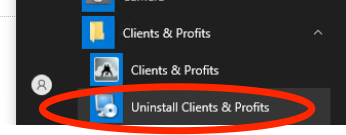
Go to start the menu. In the Clients & Profits folder you will see a link for "Uninstall Clients & Profits". Run the Uninstall.
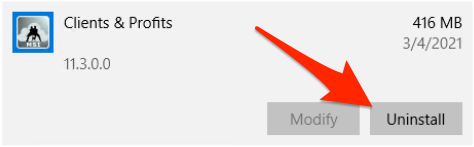
In Settings / Control Panel. Search for "add or remove programs", then uninstall Clients & Profits using the "remove program" option.
-
Download and run the Clients & Profits 11.3 Installer.
If you need a link or login details contact the Clients & Profits Help Desk.Running the Clients & Profits installer executable or MSI may
not be allowed on your Windows workstation.
If you are prompted with a "Windows protected your PC" window,
click here for more information. -
Open Clients & Profits, enter your login and passcode.
Then, choose mainframe from the database dropdown to enter your site key.
More information on entering your site key can be found here -
Next you'll be prompted to activate your software. Click ok to the message. Verify your company information is correct. Then click Activate Software.
You should recieve a message that your serial number has been changed and Clients & Profits is ready to use!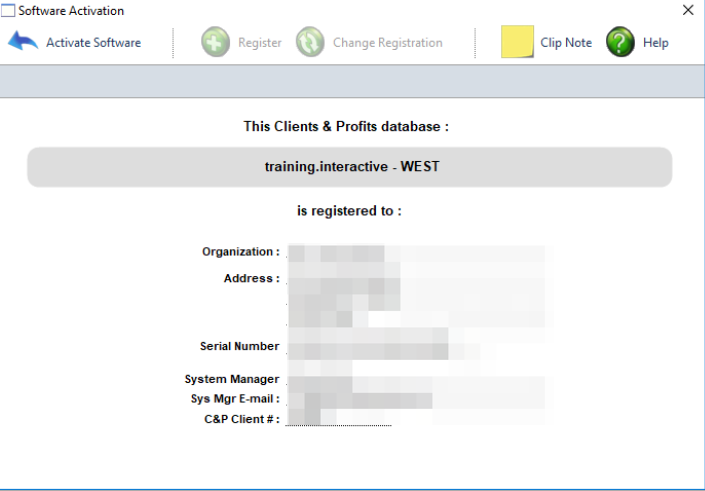


© 2026 Clients & Profits, Inc. All Rights Reserved.